
What are Offline Evaluations via Logging?

Offline evaluations allow you to test and validate your AI Agent before it goes live with end users. Unlike online evaluations that run in production, offline evals give you the opportunity to:
  • Test against a curated set of inputs with expected outputs
  • Validate tool calls, retrieved context, and generation quality
  • Run evaluations in a controlled environment
  • Iterate quickly without impacting real users
By combining Maxim’s logging capabilities with the withEvaluators function, you can capture every interaction of your AI system and automatically run evaluations against expected outcomes.

Prerequisites

Before you start, ensure you have:
  1. Maxim SDK installed in your project
  2. API key from the Maxim platform
  3. Log repository created in your Maxim workspace

Getting Started

Step 1: Install the SDK

pip install maxim-py

Step 2: Initialize the Logger

from maxim import Maxim

# Initialize Maxim SDK
maxim = Maxim({"api_key": "your-api-key"})

# Get the logger for your repository
logger = maxim.logger({"id": "your-log-repository-id"})

Step 3: Logging a Trace or Span

Before you log data, it is helpful to understand the hierarchy of Maxim’s logging objects:
  • Trace: A trace represents a single interaction or request in your application (e.g. a user query). This is the core unit of logging.
  • Span: A span represents a unit of work within a trace (e.g. a retrieval step, a generation step, or a custom function execution).
  • Session (Optional): A session is a logical grouping of multiple traces (e.g. a multi-turn conversation).

Basic Workflow: Trace -> Span

The most common workflow is to create a trace for a single test case and add spans to it.
# Create a trace for a test case
trace = logger.trace({
    "id": "test-case-001",
    "name": "customer-support-query"
})

# Set the input (user query)
trace.set_input("What is your refund policy?")

# ... run your AI logic ...

# Create a generation (a type of span)
generation = trace.generation({
    "id": "gen-id",
    "name": "llm-response",
    "provider": "openai",
    "model": "gpt-4o",
    "messages": [
        {"role": "user", "content": "What is your refund policy?"}
    ]
})

# ... log generation result ...
generation.end()

# Set the output (AI response)
trace.set_output("Our refund policy allows returns within 30 days of purchase...")

# End the trace
trace.end()

Session -> Trace -> Span

If you need to group multiple traces together (e.g. for a chat session), you can wrap them in a session.
# Create a session
session = logger.session({
    "id": "session-user-123",
    "name": "support-chat-session"
})

# Create a trace linked to this session
trace = session.trace({
    "id": "turn-1",
    "name": "user-query-1"
})

# ... use trace as normal ...

trace.end()
session.end()

Step 4: Log Generations, Retrievals, and Errors

Detailed logging allows you to debug issues and run granular evaluations. You can log LLM calls (Generations), context fetching (Retrievals), and any errors that occur.

Generations (LLM Calls)

Track each LLM call within your trace to capture detailed information about model interactions, including prompt, completion, and usage stats.
from uuid import uuid4
import time

# Create a generation within the trace
generation = trace.generation({
    "id": str(uuid4()),
    "name": "policy-lookup",
    "provider": "openai",
    "model": "gpt-4o",
    "messages": [
        {"role": "system", "content": "You are a helpful customer support assistant."},
        {"role": "user", "content": "What is your refund policy?"}
    ],
    "model_parameters": {"temperature": 0.7}
})

# ... make API call to LLM provider ...

# Log the result
generation.result({
    "id": "chatcmpl-123",
    "object": "chat.completion",
    "created": int(time.time()),
    "model": "gpt-4o",
    "choices": [{
        "index": 0,
        "message": {
            "role": "assistant",
            "content": "Our refund policy allows returns within 30 days..."
        },
        "finish_reason": "stop"
    }],
    "usage": {
        "prompt_tokens": 50,
        "completion_tokens": 100,
        "total_tokens": 150
    }
})

generation.end()

Retrievals (RAG)

For RAG systems, logging retrieval steps helps you evaluate the quality of your context separately from the generation.
# Log a retrieval step
retrieval = trace.retrieval({
    "id": str(uuid4()),
    "name": "knowledge-base-search"
})

retrieval.set_input("refund policy")

# ... perform search ...

# Log retrieved documents
retrieval.set_output([
    {"content": "Refunds are processed within 3-5 business days.", "score": 0.95, "source": "doc-1"},
    {"content": "Returns must be in original packaging.", "score": 0.88, "source": "doc-2"}
])

retrieval.end()

Tool Calls

If your agent uses tools (e.g., function calling), logging these interactions allows you to evaluate tool usage accuracy.
# Log a tool call
tool_call_span = trace.tool_call({
    "id": "call_123",
    "name": "get_weather",
    "description": "Get current temperature for a given location",
    "args": {"location": "San Francisco, CA"}
})

# ... execute tool ...
result = "72°F and sunny"

# Log the result
tool_call_span.result(result)

tool_call_span.end()

Custom Metrics

In addition to running evaluators, you may want to log custom numeric metrics such as cost, latency, or pre-computed scores. You can use the addMetric method (or add_metric in Python) on any entity (trace, generation, retrieval, or session).
# Attach metrics to a trace
trace.add_metric("user_feedback_score", 4.5)

# Attach metrics to a generation
generation.add_metric("cost", 0.002)
generation.add_metric("latency_ms", 450)

Errors

Capturing errors is crucial for debugging. You can log errors on any entity (trace, span, generation, or tool call).
generation.error({
    "message": "Rate limit exceeded. Please try again later.",
    "type": "RateLimitError",
    "code": "429"
})

Running Evaluators

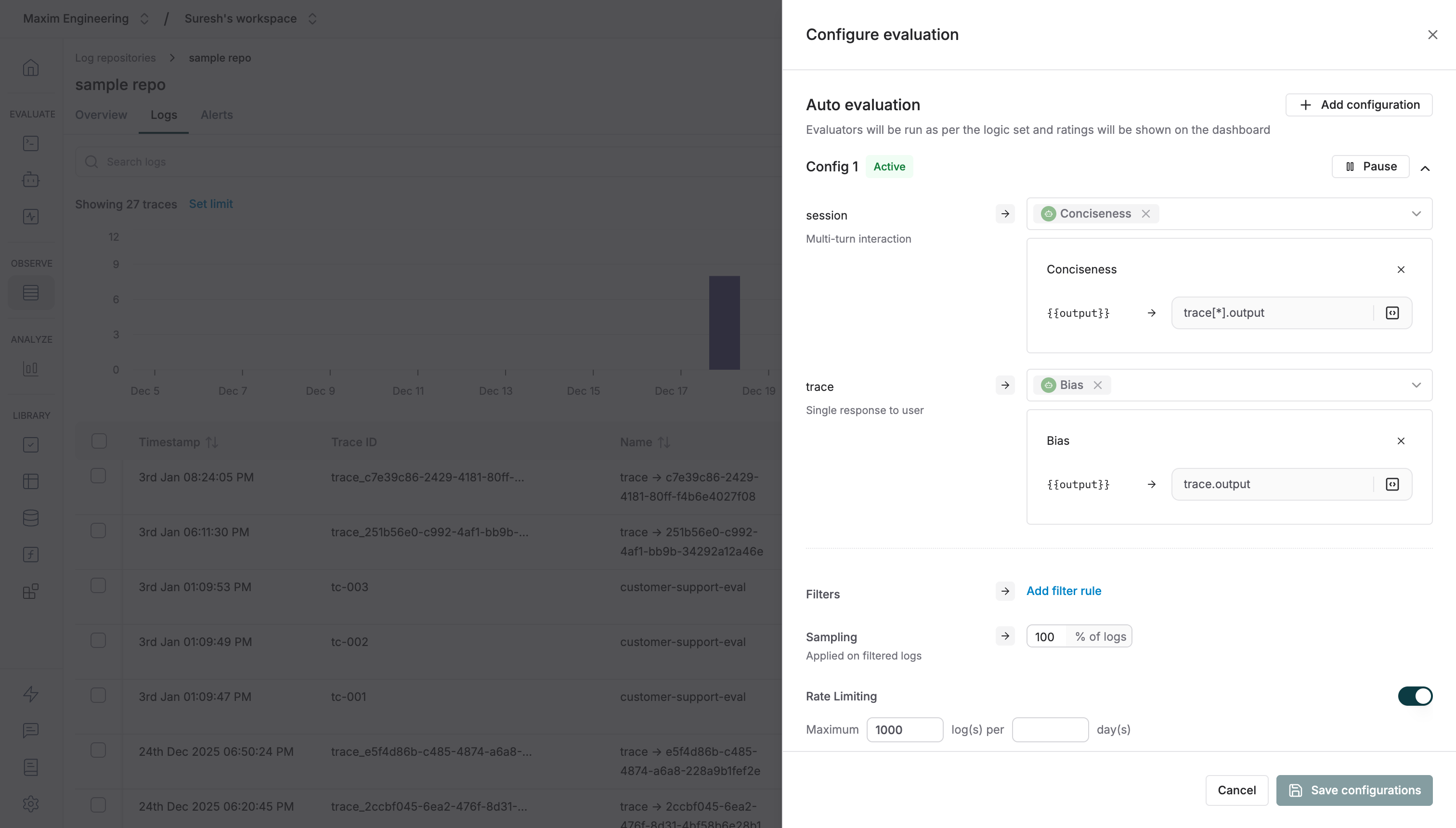
You can configure evaluations to run on logs pushed via the SDK. To configure this, in your log repository dashboard, click on “Configure evaluation”. Here, you can choose the evaluators to run on your traces or sessions. Set the sampling to 100% and remove all applied filters so that evaluations are run on all the logs. Screenshot of evaluation configuration
Attaching Evaluators via SDK

The withEvaluators function allows you to attach evaluators to any component of your trace (trace itself, spans, generations, or retrievals). Evaluators run automatically once all required variables are provided.
# Attach evaluators to the entire trace
trace.evaluate().with_evaluators("faithfulness", "completeness")

# Attach evaluators to the generation
generation.evaluate().with_evaluators("clarity", "toxicity", "output-relevance")

Providing Variables for Evaluation

Evaluators require specific variables to perform their assessment. Use the withVariables method to provide these values:
# Provide variables for evaluation
generation.evaluate().with_variables(
    {
        "input": "What is your refund policy?",
        "output": "Our refund policy allows returns within 30 days...",
        "expected_output": "Returns are accepted within 30 days of purchase for a full refund."
    },
    ["clarity", "output-relevance", "semantic-similarity"]
)

Chaining Evaluators and Variables

You can chain withEvaluators and withVariables together for cleaner code:
generation.evaluate() \
    .with_evaluators("clarity", "toxicity", "semantic-similarity") \
    .with_variables({
        "input": user_query,
        "output": ai_response,
        "expected_output": expected_answer
    })

Putting it all together

Here’s a comprehensive example that demonstrates running offline evaluations with expected outputs:
from maxim import Maxim

from uuid import uuid4
import openai
import time

# Initialize clients
maxim = Maxim({"api_key": "your-maxim-api-key"})
logger = maxim.logger({"id": "your-log-repository-id"})
client = openai.OpenAI(api_key="your-openai-api-key")

# Define test cases with expected outputs
test_cases = [
    {
        "id": "tc-001",
        "input": "What is your refund policy?",
        "expected_output": "Returns are accepted within 30 days for a full refund.",
        "expected_tool_calls": None
    },
    {
        "id": "tc-002",
        "input": "Check the status of order #12345",
        "expected_output": "Order #12345 is currently in transit.",
        "expected_tool_calls": ["get_order_status"]
    },
    {
        "id": "tc-003",
        "input": "What products do you recommend for dry skin?",
        "expected_output": "For dry skin, we recommend our Hydrating Moisturizer and Gentle Cleanser.",
        "expected_tool_calls": ["search_products"]
    }
]

def run_offline_evaluation(test_case):
    """Run a single test case with logging and evaluation."""
    
    # Create a trace for this test case
    trace = logger.trace({
        "id": test_case["id"],
        "name": "customer-support-eval",
        "tags": {
            "test_type": "offline_eval",
            "has_expected_tool_calls": str(test_case["expected_tool_calls"] is not None)
        }
    })
    
    trace.set_input(test_case["input"])
    
    # Create a generation for the LLM call
    generation_id = str(uuid4())
    generation = trace.generation({
        "id": generation_id,
        "name": "support-response",
        "provider": "openai",
        "model": "gpt-4o",
        "messages": [
            {"role": "system", "content": "You are a helpful customer support assistant."},
            {"role": "user", "content": test_case["input"]}
        ],
        "model_parameters": {"temperature": 0.7}
    })
    
    # Simulate and log tool calls if expected
    if test_case.get("expected_tool_calls"):
        for tool_name in test_case["expected_tool_calls"]:
            tool_span = trace.tool_call({
                "id": str(uuid4()),
                "name": tool_name,
                "args": {"query": test_case["input"]} # Simulated args
            })
            # Simulate tool execution result
            tool_span.result({"status": "success", "data": "simulated_data"})
            tool_span.end()
    
    # Attach evaluators to the generation
    evaluators_to_attach = ["clarity", "toxicity", "output-relevance"]
    if test_case["expected_output"]:
        evaluators_to_attach.append("semantic-similarity")
    if test_case["expected_tool_calls"]:
        evaluators_to_attach.append("tool-call-accuracy")
    
    generation.evaluate().with_evaluators(*evaluators_to_attach)
    
    # Make the actual LLM call
    start_time = time.time()
    response = client.chat.completions.create(
        model="gpt-4o",
        messages=[
            {"role": "system", "content": "You are a helpful customer support assistant."},
            {"role": "user", "content": test_case["input"]}
        ],
        temperature=0.7
    )
    latency = (time.time() - start_time) * 1000
    
    ai_output = response.choices[0].message.content
    
    # Log the generation result
    generation.result({
        "id": response.id,
        "object": "chat.completion",
        "created": int(time.time()),
        "model": "gpt-4o",
        "choices": [{
            "index": 0,
            "message": {
                "role": "assistant",
                "content": ai_output
            },
            "finish_reason": response.choices[0].finish_reason
        }],
        "usage": {
            "prompt_tokens": response.usage.prompt_tokens,
            "completion_tokens": response.usage.completion_tokens,
            "total_tokens": response.usage.total_tokens
        }
    })
    
    # Provide variables for evaluation (including expected output for comparison)
    generation.evaluate().with_variables(
        {
            "input": test_case["input"],
            "output": ai_output,
            "expected_output": test_case["expected_output"]
        },
        evaluators_to_attach
    )
    
    generation.end()
    
    # Set trace output and end
    trace.set_output(ai_output)
    trace.end()
    
    return {
        "test_id": test_case["id"],
        "input": test_case["input"],
        "output": ai_output,
        "expected_output": test_case["expected_output"]
    }

# Run all test cases
print("Running offline evaluation suite...")
results = []
for test_case in test_cases:
    result = run_offline_evaluation(test_case)
    results.append(result)
    print(f"✓ Completed: {test_case['id']}")

print(f"\nCompleted {len(results)} test cases. View results in your Maxim dashboard!")

Example: RAG System

For RAG (Retrieval-Augmented Generation) systems, you can evaluate both retrieval quality and generation accuracy:
def evaluate_rag_query(query, expected_answer, expected_context):
    trace = logger.trace({
        "id": str(uuid4()),
        "name": "rag-eval"
    })
    
    trace.set_input(query)
    
    # Log the retrieval step
    retrieval = trace.retrieval({
        "id": str(uuid4()),
        "name": "document-retrieval"
    })
    
    retrieval.set_input(query)
    
    # Simulate retrieval (replace with your actual retrieval logic)
    retrieved_docs = your_retrieval_function(query)
    
    retrieval.set_output([
        {"content": doc["content"], "score": doc["score"]}
        for doc in retrieved_docs
    ])
    
    # Attach retrieval evaluators
    retrieval.evaluate() \
        .with_evaluators("context-relevance", "context-precision") \
        .with_variables({
            "input": query,
            "context": "\n".join([doc["content"] for doc in retrieved_docs]),
            "expected_output": expected_context
        })
    
    retrieval.end()
    
    # Log the generation step
    generation = trace.generation({
        "id": str(uuid4()),
        "name": "answer-generation",
        "provider": "openai",
        "model": "gpt-4o"
    })
    
    # Generate answer using retrieved context
    answer = generate_answer(query, retrieved_docs)
    
    generation.result({
        "choices": [{"message": {"role": "assistant", "content": answer}}]
    })
    
    # Attach generation evaluators
    generation.evaluate() \
        .with_evaluators("faithfulness", "output-relevance", "semantic-similarity") \
        .with_variables({
            "input": query,
            "output": answer,
            "context": "\n".join([doc["content"] for doc in retrieved_docs]),
            "expected_output": expected_answer
        })
    
    generation.end()
    trace.set_output(answer)
    trace.end()

Example: Tool Calls

For agent workflows that include tool calls, you can validate that the correct tools are being called:
def evaluate_agent_with_tools(query, expected_tool_calls, expected_output):
    trace = logger.trace({
        "id": str(uuid4()),
        "name": "agent-tool-eval"
    })
    
    trace.set_input(query)
    
    # Run your agent logic
    agent_result = your_agent_function(query)
    
    # Log each tool call
    for tool_call in agent_result.tool_calls:
        tc = trace.tool_call({
            "id": tool_call["id"],
            "name": tool_call["function"]["name"],
            "description": f"Tool call: {tool_call['function']['name']}",
            "args": tool_call["function"]["arguments"]
        })
        
        tc.result(tool_call["result"])
        
        # Attach tool call evaluator
        tc.evaluate() \
            .with_evaluators("tool-selection") \
            .with_variables({
                "input": query,
                "tool_calls": str(agent_result.tool_calls),
                "expected_tool_calls": str(expected_tool_calls)
            })
        
        tc.end()
    
    # Log the final generation
    generation = trace.generation({
        "id": str(uuid4()),
        "name": "final-response",
        "provider": "openai",
        "model": "gpt-4o"
    })
    
    generation.result({
        "choices": [{"message": {"role": "assistant", "content": agent_result.final_answer}}]
    })
    
    generation.evaluate() \
        .with_evaluators("output-relevance", "semantic-similarity", "tool-call-accuracy") \
        .with_variables({
            "input": query,
            "output": agent_result.final_answer,
            "expected_output": expected_output,
            "tool_calls": str([tc["function"]["name"] for tc in agent_result.tool_calls]),
            "expected_tool_calls": str(expected_tool_calls)
        })
    
    generation.end()
    trace.set_output(agent_result.final_answer)
    trace.end()

Viewing Evaluation Results

After running your offline evaluations, view the results in the Maxim dashboard:
  1. Navigate to your Log Repository
  2. View the Logs tab to see all logged traces
  3. Click on any trace to see detailed evaluation results
  4. Use the Evaluation tab to see scores, reasoning, and pass/fail status
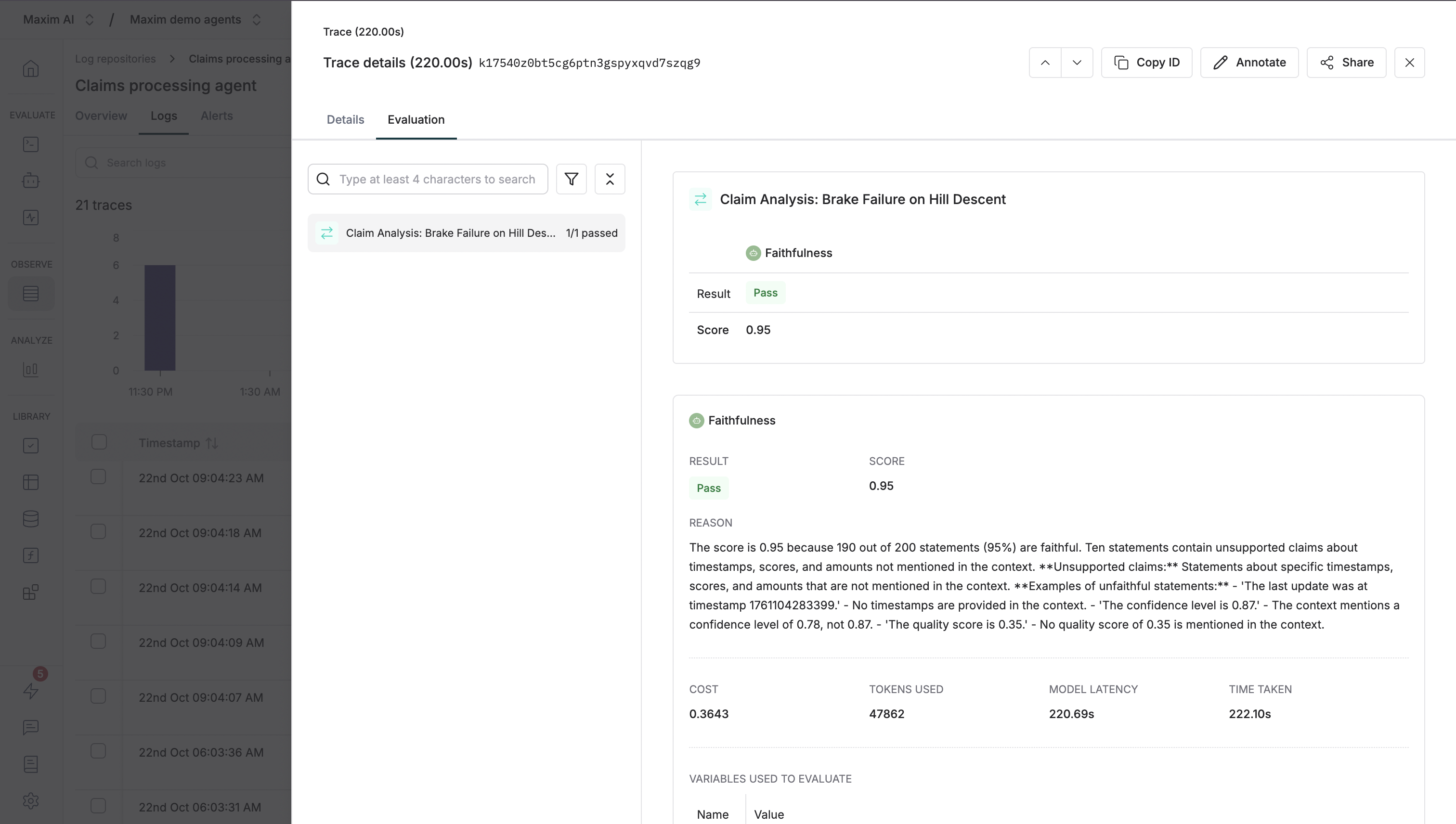
Screenshot of evaluation results
  1. The “overview” tab in your logs repository provides insights on your logs and evaluation runs, including metrics like latency, cost, score, error rate, and more. You can filter your logs by different criteria, like tags, cost, latency, etc.
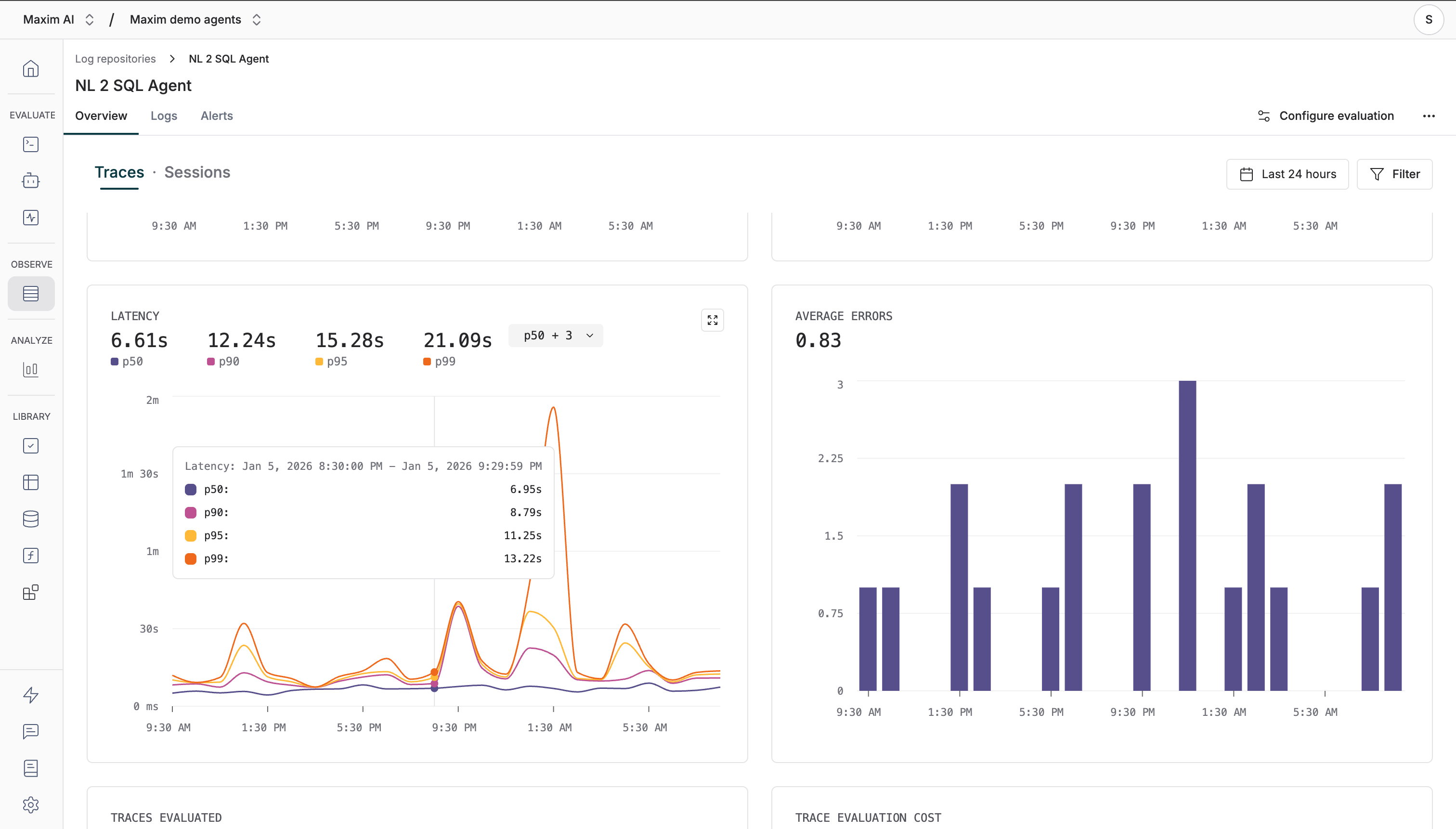
Screenshot of evaluation overview

Best Practices

1

Use deterministic test IDs

Use consistent, meaningful IDs for your test cases to make it easy to track and compare runs over time.
2

Include expected outputs

Always include expected outputs in your test cases for comparison evaluators like semantic-similarity to provide meaningful scores.
3

Tag your traces

Use tags to categorize your offline evaluation runs (e.g., test_type: offline_eval, version: v1.2.0) for easy filtering.
4

Choose appropriate evaluators

Select evaluators that match your use case:
  • Semantic Similarity: Compare output against expected output
  • Faithfulness: Ensure answers are grounded in provided context
  • Tool Call Accuracy: Validate correct tool selection
  • Context Relevance: Assess retrieval quality in RAG systems

Next Steps

Schedule a demo to see how Maxim AI helps teams ship reliable agents.